
In active beta · public release coming soon

Small Windows tools
that fix what the
big vendors won't.

One-person studio shipping polished Windows desktop tools — 3D printing, automotive electronics, industrial dashboards, science & maker tooling. Built for people who want to use their gear, not babysit it. Multiple projects in active development. First public release coming soon.

THE STUDIO

One developer. Multiple projects.
Polished tools that don't suck.

HONEYBADGER SOFTWARE INC is a small studio building tools across the things you actually own and tinker with — 3D printers, the car in your garage, the machinery at your plant, the maker projects on your bench. Every product is a polished Windows installer or a real piece of open hardware. No "pip install" instructions for end users. No "convert your firmware first." No "buy 5 other things first." Just tools that work.

🧊

3D Printing

J1 Bridge — drag-drop slicing, live monitoring, camera, all on stock Snapmaker firmware. Public beta, more printers planned.

🚗

Automotive

C7 Corvette dashboard kit — HPTuners-style live tuning gauges, 250-app multimedia head unit, multi-interlock nitrous controller. Raw-CAN passive read (no ECU reflash, warranty intact). Commercial kit for the C7 community, prototype validated, pre-launch.

🏭

Industrial

Plant monitoring tooling — operator dashboards, OPC UA / MQTT / Modbus, per-shift costing, scaling from 1 to 150 machines. In-house production today, productized later.

🔬

Maker & Learn

PLC documentation tooling, vendor-hardware knowledge bases, side projects for people who want to understand the gear they own — not just operate it.

FIRST PRODUCT — IN ACTIVE BETA

J1 Bridge

OrcaSlicer + Snapmaker J1, finally talking to each other.

📂

Drag-drop slicing

Drop an STL on the Home tab. We slice with the correct J1 profile, patch the printer's broken start macro, upload, and start the print. One drag. No Reddit hacks.

📡

Live monitoring during prints

Bed + both nozzles + ETA + pause/resume/cancel from your desk. Works on stock V2.8.0 firmware — no Klipper conversion, warranty intact. Validated over multi-day continuous use.

📷

Camera tab built-in

Plug a USB webcam in, pick it from the dropdown. Or point at a network MJPEG stream. No OctoPi flash, no SD card configuration, no separate Pi.

📦

One-click installer

Real Windows installer. No Python, no Docker, no terminal commands. If your grandmother can use Photoshop, she can install J1 Bridge.

🛡

Honest Known Issues page

Every product ships with a built-in Known Issues tab on day one. No surprises. No marketing claim the code can't back up.

🦡

Free + open development

Free for personal use. Patreon for those who want to feed the badger. No telemetry, no analytics, no "phone home."

PROOF OF LIFE · CAPTURED LIVE FROM THE APP

This is the running product.
Not a mockup. Not vaporware.

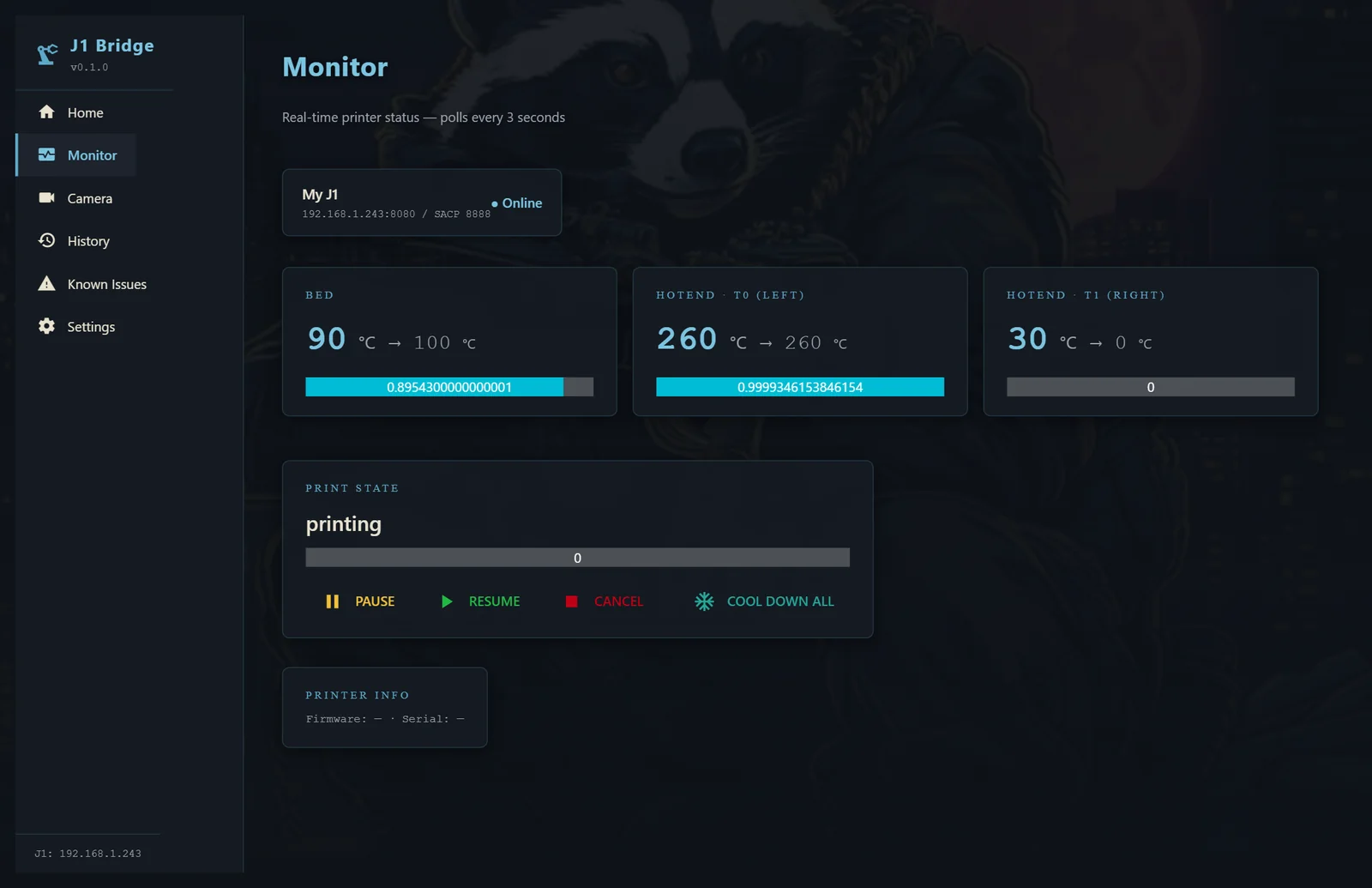
Screenshots below pulled directly from the live NiceGUI server while an actual print was in progress. Bed at 90°C climbing to 100. Left nozzle locked at 260°C. Right nozzle at ambient (this print only uses T0). Live monitoring has held continuously for multiple days on stock V2.8.0 firmware.

J1 Bridge Monitor tab showing live print at 90°C bed and 260°C hotend
Monitor tab during a live print. Bed + dual hotends + state + controls, refreshing every 3 seconds. Pause/Resume/Cancel from your desk.
J1 Bridge Home tab with drag-drop STL upload
Home tab. Drag the STL anywhere on the window — slicing kicks off, gcode validates, auto-uploads, print starts.
J1 Bridge Camera tab with USB and Network camera modes
Camera tab. USB webcam or network MJPEG, no OctoPi flash. Snapshot button writes to disk.
J1 Bridge Settings tab showing safety gates and printer profile
Settings tab. Safety gates (fan clamp, start macro patch, bed-temp override) default ON. Add multiple printers.
J1 Bridge Known Issues tab listing every limitation honestly
Known Issues tab. Every limit listed honestly. LCD lock-out while monitoring, history page WIP, etc. No surprises.

All screenshots captured automatically via Playwright against the production NiceGUI server (localhost:8765) on 2026-05-28. App icons are the actual J1 Bridge brand. Honey Badger backgrounds are bundled with the installer.

SECOND PRODUCT — COMMERCIAL KIT · PRE-LAUNCH

C7 Corvette Dashboard

The aftermarket touchscreen head unit GM never gave the C7. Three full dashboards in one sealed kit — tuning gauges, multimedia, nitrous safety control.

HPTuners-style live gauges

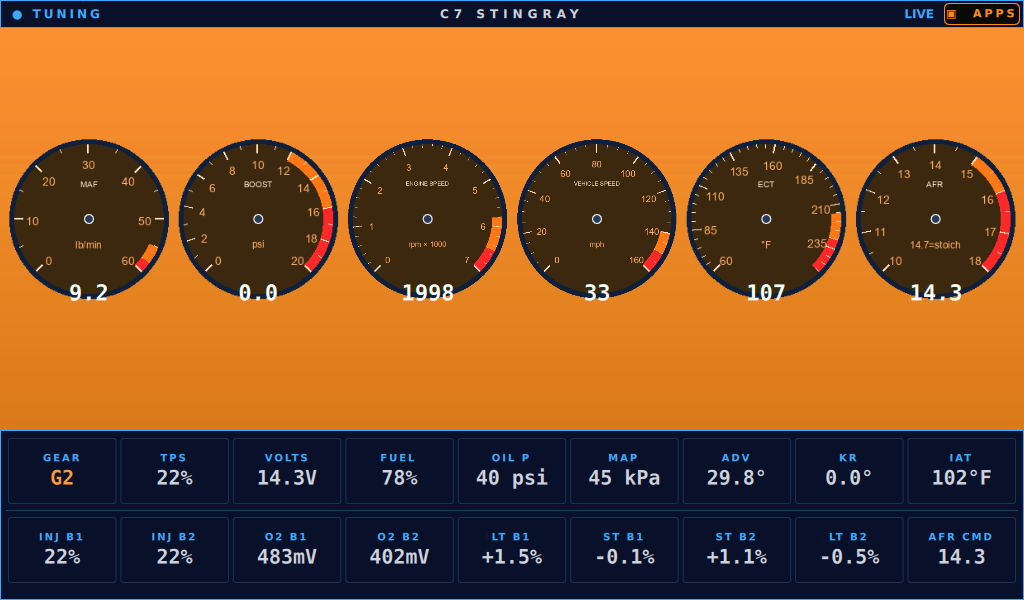
MAF, boost, RPM, speed, ECT, AFR — big analog dials with proper redline arcs, plus 24 status cells for fuel trims, injector duty, knock retard, timing advance, oil pressure. Lambo-green theme stock; multiple color themes built in. Reads from the OEM CAN bus passively — no ECU reflash, no warranty void.

📺

250-app multimedia head unit

10 tabs, 25 apps per tab: streaming music, video, live TV, news, sports, weather + maps, podcasts, social, productivity tools, browser games. Netflix / Prime / Disney+ DRM works — Widevine pre-installed. Bluetooth audio direct to your OEM stereo, no aux cable required.

Multi-interlock nitrous control

Software-managed RPM-window switch with seven independent interlocks: physical arm switch, software arm, gear ≠ P/N, RPM in window, TPS at WOT, coolant warmed, bottle temp safe. Programmable purge bursts. Bottle heater thermostat with hard cutoff. Fail-safe default-OFF on every relay.

🛟

Always-available touch escape

Any app you open gets a draggable BACK + KEYBOARD overlay. Auto-hides after 5 sec for immersion, wakes on touch. Auto-respawns if it crashes. No "stuck on a sign-in page with no way out" — ever.

🔧

OBD-II + raw CAN, both

Reads broadcast frames (RPM, TPS, gear, coolant) for low-latency live data AND falls back to OBD-II Mode 22 for harder signals (oil pressure, fuel level, intake air, voltage). Validated against the C7 community VBOX reference + opendbc Cadillac CT6 powertrain DBC.

📦

Sealed turnkey kit

Touchscreen, head unit, OBD2 cable, mount, wiring, all included. Plug into the OBD port, mount the screen, power on. No flashing, no soldering, no Linux command line. Closed-source — this one's a product, not a community DIY.

SUPPORTED TRIMS

2014–2019 C7 Stingray · Grand Sport · Z06 · ZR1

Trim-specific signal maps for all four variants. Z06 / ZR1 boost gauge appears automatically when supercharger hardware is detected. Auto trans, M7 manual, MagneRide all detected.

THE WORKFLOW COLLAPSE

Replace four tools and a Reddit search with one drag-and-drop.

What you do now
What J1 Bridge does
Install 350 MB of Snapmaker Luban, fight the slicer, export gcode, manually upload via Luban or curl
Drop the STL on the Home tab. It slices, uploads, and prints.
Walk to the printer to check temps and progress
Live Monitor tab — bed + both nozzles + ETA + controls from your desk
Buy an OctoPi rig, flash an SD card, configure mjpg-streamer to add a webcam
Plug a USB webcam in, pick it from the dropdown
Convert to Klipper to get any real dashboard (voids warranty, hours of work, scary)
One-click installer. No Klipper. No Pi. No soldering. Warranty intact.
Realize the J1's start macro leaves wiper marks on every print, search Reddit for fixes
We patch it automatically. Every print starts clean.
Pretend the firmware doesn't have bugs
Bundled Known Issues page lists every limit honestly
PHILOSOPHY

Why HONEYBADGER

The honey badger doesn't care. It chews through firmware bugs vendors won't fix, walks past "this can't be done" forum threads, and ships the polished thing anyway.
WHAT'S NEXT

Active builds

ACTIVE BETA

J1 Bridge v0.1

Drag-drop slice, live monitor, camera tab, Known Issues page. Installer + Patreon launch imminent.

IN DEVELOPMENT

J1 Bridge v0.2

"Release LCD" toggle, dual-extruder T1 readout polish, multi-printer dashboard support, auto-updater stability.

HARDWARE PROTOTYPE · COMMERCIAL KIT

C7 Corvette dashboard kit

Touchscreen head unit for 2014-2019 C7 Stingray / Grand Sport / Z06 / ZR1. Passive CAN read of RPM / TPS / gear / coolant / oil pressure / boost. Three integrated dashboards: tuning gauges, 250-app multimedia, safety-interlocked nitrous controller. Sealed commercial kit — closed-source, pre-launch.

INDUSTRIAL · INTERNAL

Maguire blender monitoring

Plant-scale operator dashboards, scaling from 1 to 150 blenders. The pattern feeds back into everything else.

Get notified when J1 Bridge ships

Public release lands with the Patreon launch. ⭐ the GitHub profile or follow the brand below to get pinged when v0.1.0 drops.

No email list yet — we'll add one when Patreon is live. For now, GitHub watch is the cleanest signal.